AgriCAD by Agrima

Laser scans, from the field to CAD and to your client

An online point cloud viewer your clients open from a link, a Windows workstation for scan-to-CAD drafting and an AutoCAD plugin – one platform for E57 scans from any scanner.

  • Any E57 scanner
  • AutoCAD 2019–2026
  • 12 languages
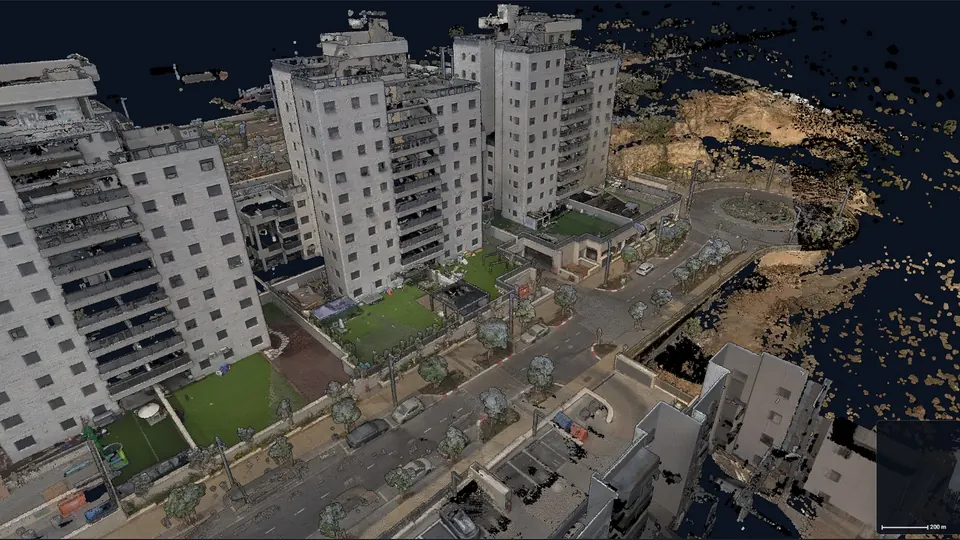
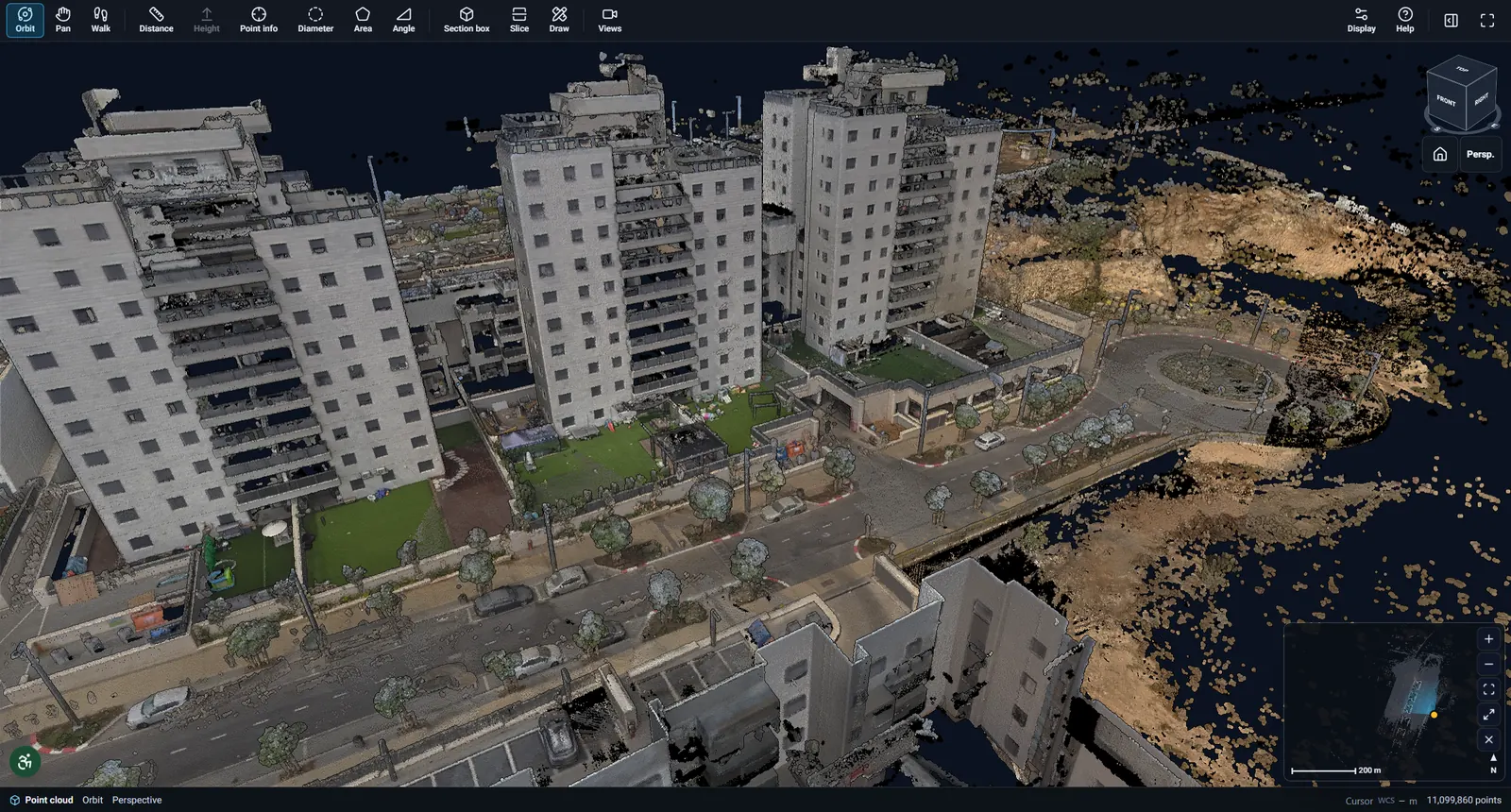
A street laser scan with apartment buildings, streamed as a 3D point cloud in the AgriCAD online viewer Live in the browser

Formats and tools we work with

E57 from these scanners opens in AgriCAD; the DXF and RCP files you export open in these CAD, BIM and GIS programs. Need another format or device? We add it on demand.

CAD & BIM

  • AutoCADplugin2019–2026
  • Civil 3DRCP
  • RevitRCP
  • ReCapRCP
  • NavisworksRCP
  • MicroStationDXF
  • BricsCADDXF
  • ZWCADDXF

Scanners · E57

  • Leica Geosystems
  • FARO
  • Trimble
  • Topcon
  • RIEGL
  • CHCNAV
  • NavVis
  • GeoSLAM
  • Emesent
  • Matterport

GIS

  • QGISDXF
  • ArcGISDXF

File formats

  • E57importASTM E2807
  • DXFexport
  • RCP / RCSexportAutodesk ReCap
  • DWGpluginAutoCAD

01Products

Three products, one workflow

Each product stands on its own; together they cover the whole way – from the scan on site, through drafting in the office, to your client.

  • Online viewer

    AgriCAD Online Viewer

    Share a scan with your client in a link

    • View links with expiry, nothing to install
    • Measuring, 360° photos and annotations
    • Embed it in your website

    Requirements: Any browser – computer, tablet and phone

    Learn more – AgriCAD Online Viewer
  • Desktop viewer for Windows

    AgriCAD Viewer

    A complete point cloud workstation

    • E57 import and drafting in an AutoCAD-style workspace
    • Survey points with ML 2.1 and MAVAT codes
    • Object detection, DXF and RCP export

    Requirements: Windows 10 / 11 · works offline

    Learn more – AgriCAD Viewer
  • AutoCAD plugin

    AgriCAD for AutoCAD

    The point cloud inside AutoCAD

    • Slices, sections and floor plans
    • Doors, windows, annotations and blocks
    • Topographic survey tools (Hanit / MAVAT)

    Requirements: AutoCAD 2019–2026

    Learn more – AgriCAD for AutoCAD

02Features

See the real thing

Screenshots of the AgriCAD online viewer on real laser scans – no renders.

Huge scans, streamed

A 62-million-point street scan opens in seconds: the viewer streams only what is in front of the camera, so it runs on an ordinary laptop and even on a phone.

Aerial view of a street point cloud with tall apartment buildings, gardens and roads

Step into 360° photos

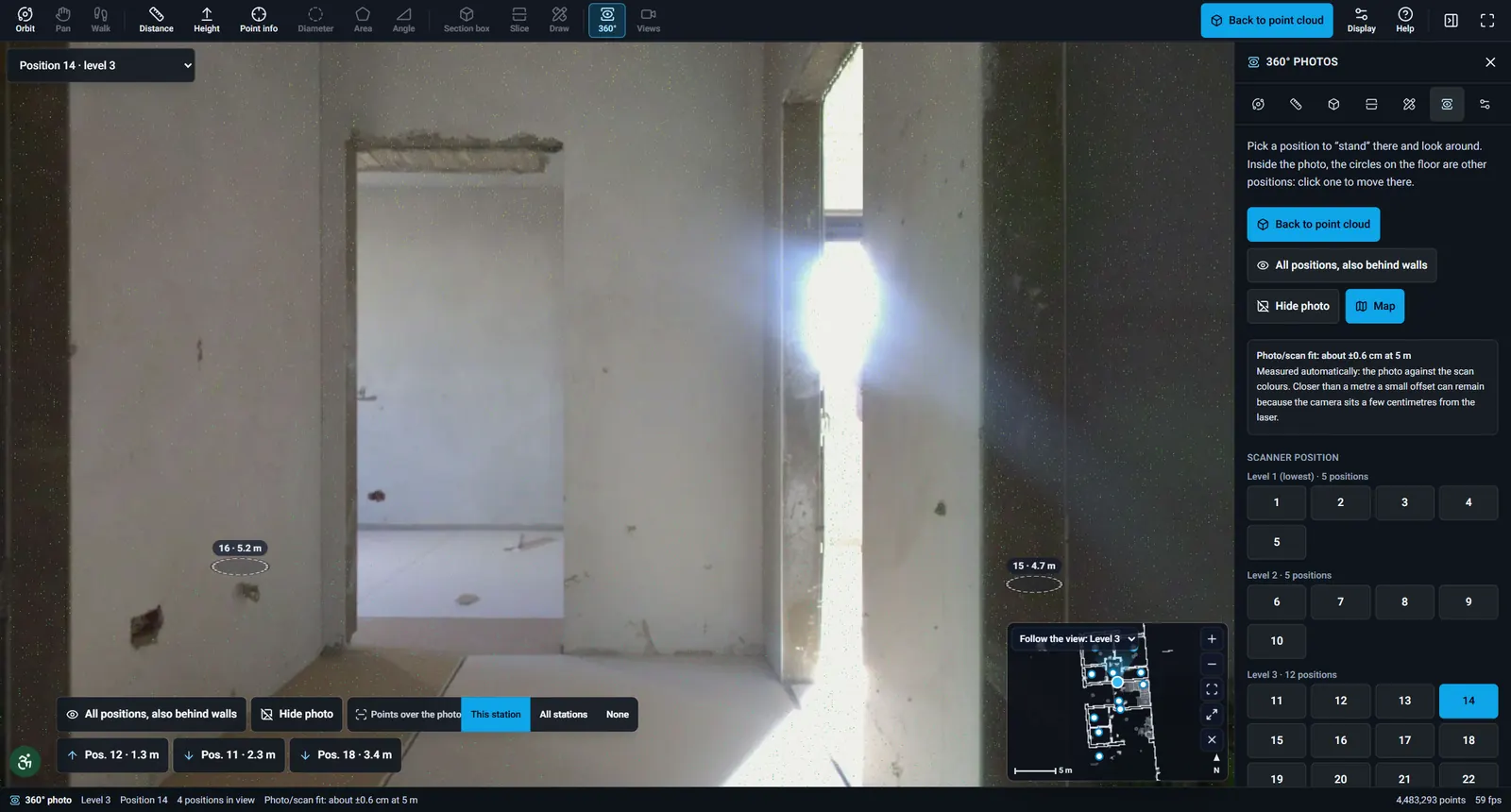
Jump to any scanner position and look around in the panorama. Circles on the floor take you to the next position; a mini-map shows where you stand.

360° photo inside a building with markers to the next scanner positions and a mini-map

Measure with confidence

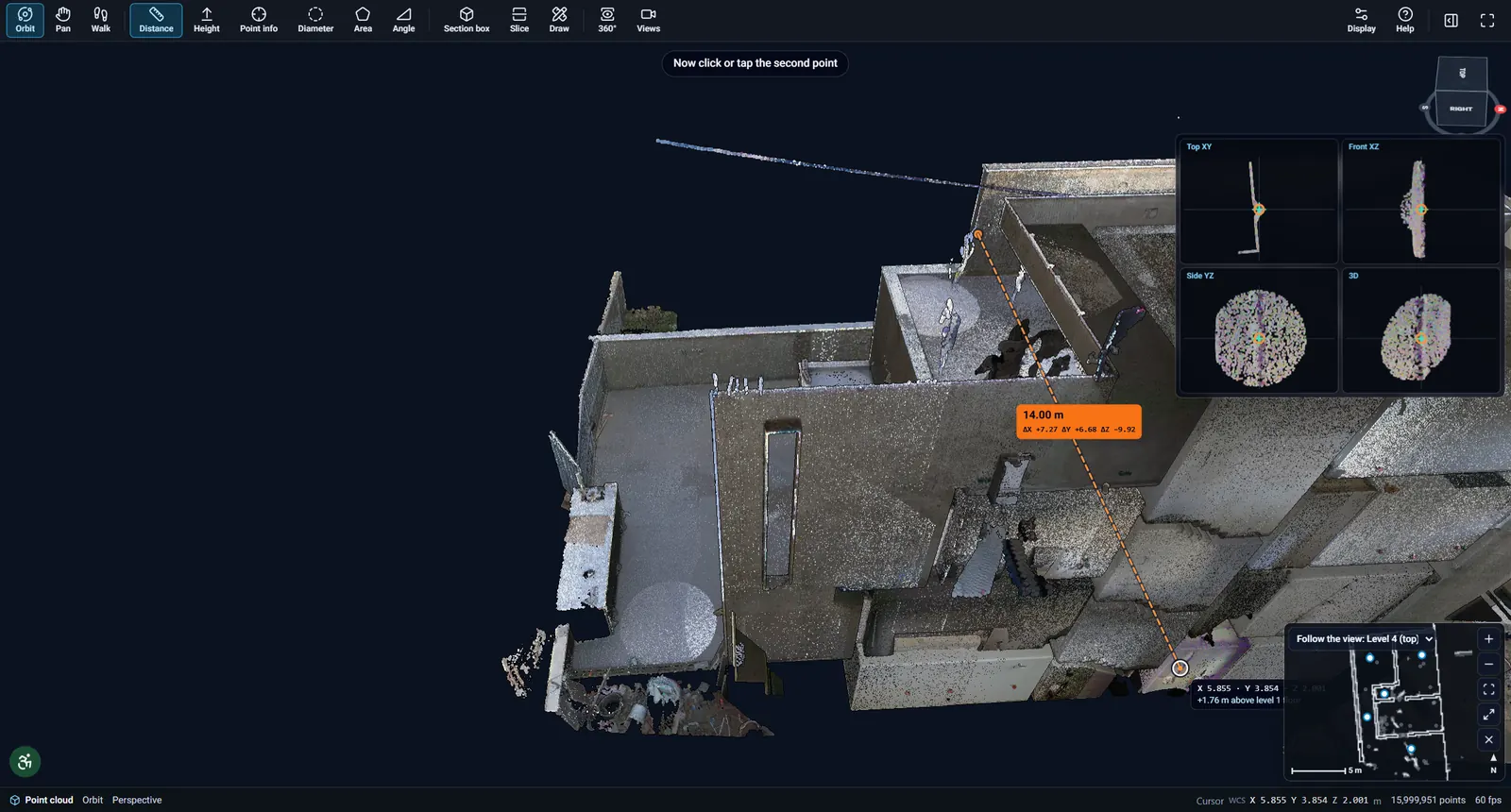
Distances, heights, areas, angles and diameters straight on the points, with top, front and side helper views so you snap to the right surface.

Distance measurement of 14 metres across a scanned building with helper views

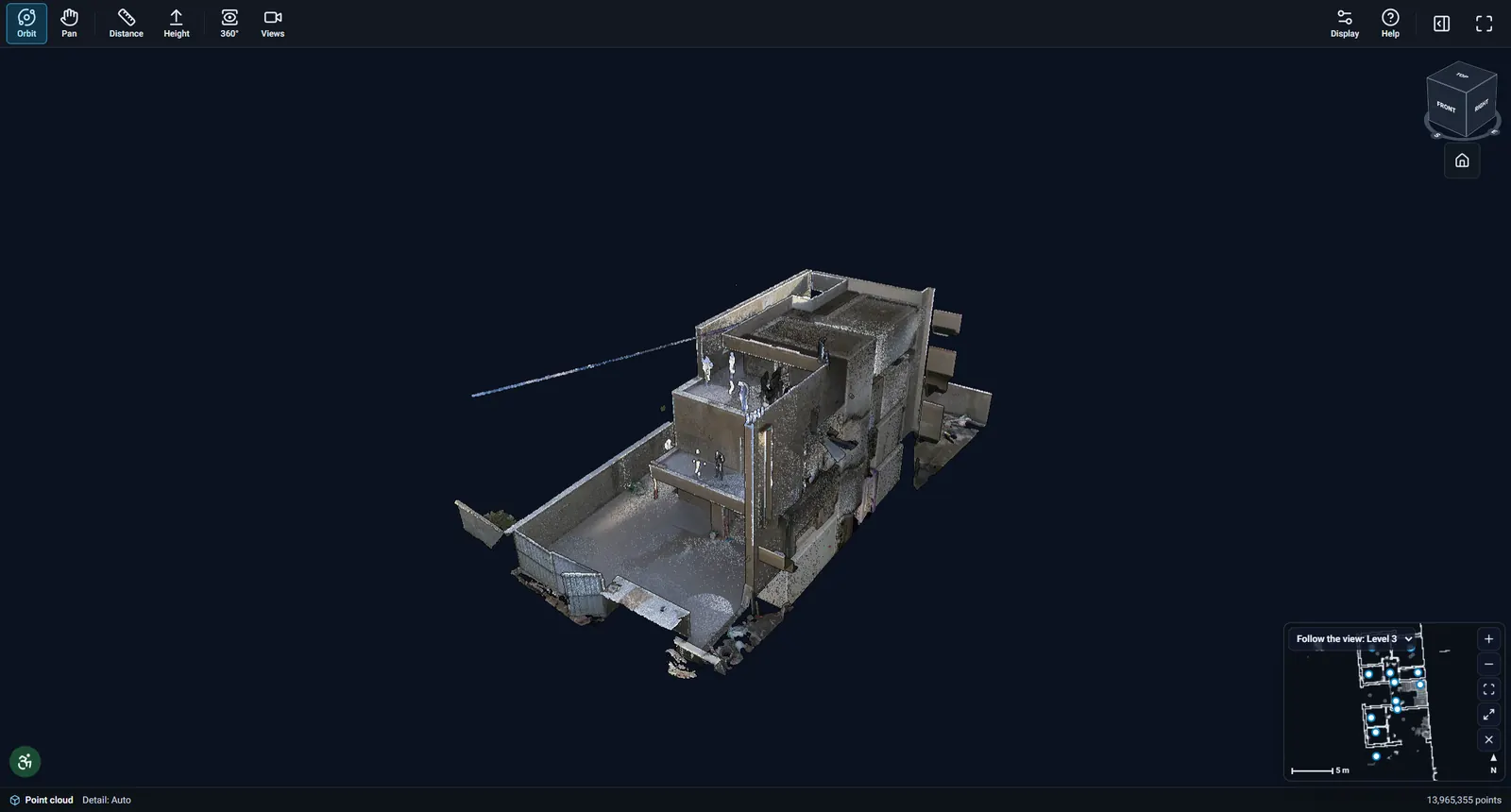
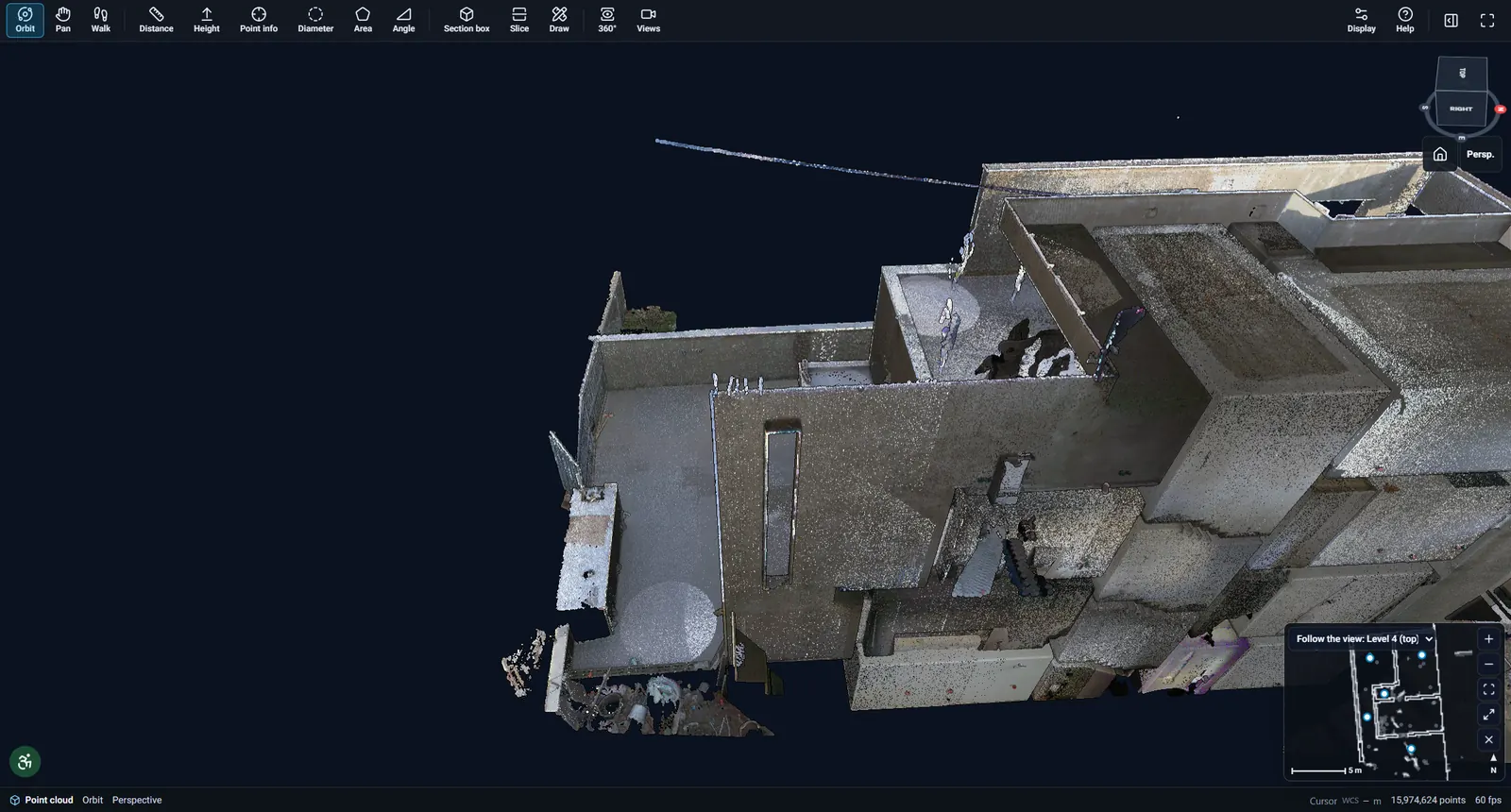
A simple view for clients

Clients get a friendly view-only mode: orbit, 360° photos and basic measuring – from a link that expires when you decide.

The client view of a scanned building in the online viewer

Everything you need to work with a scan

Built for real laser scans: hundreds of millions of points, photos from every setup and precise measuring.

  • Huge point clouds

    Progressive streaming – only what is in front of the camera – so large scans open on ordinary hardware.

  • 360° photos

    Panoramas from every scanner position, with a station map to find your way.

  • Measuring, sections & levels

    Distances, heights and areas, and clean sections floor by floor.

  • Live link to AutoCAD

    Points and drawings from the desktop viewer go straight into the drawing open in AutoCAD.

  • ML 2.1 and MAVAT codes

    Survey points with standard code systems, and object detection that suggests a code for each item.

  • Secure sharing

    Links with expiry, revocable at any time, a private portal per organisation and an audit log.

03Devices

Supported scanners and devices

If your scanner exports E57 (ASTM E2807), AgriCAD opens it – terrestrial, mobile and SLAM.

Terrestrial laser scanners

Leica RTC360, BLK360 and P-series, FARO Focus, Trimble X7, RIEGL VZ, Topcon GLS and other tripod scanners – one E57 per setup or one per project.

Mobile & SLAM scanners

CHCNAV RS10, NavVis VLX, GeoSLAM / FARO SLAM, Emesent Hovermap and other handheld, backpack and vehicle systems.

Formats

Import: E57 with colour, intensity and 360° images. Export: DXF drawings and Autodesk ReCap RCP point clouds.

Your device not listed?

We add custom devices and formats on demand – send us a sample file and we will make it work.

Ask for your device

Used across industries

Anywhere a precise record of the existing state saves a site visit.

  • Land surveying
  • Construction
  • Architecture
  • Roads & infrastructure
  • Agriculture & land
  • Heritage & restoration
  • Facility management
  • Municipal planning
  • Energy & utilities
  • Forensics

04

How it works

  1. Scan and import

    E57 files from a terrestrial, mobile or SLAM scanner open in the desktop viewer, or load into AutoCAD with the plugin.

  2. Draft and analyse

    Sections, floor plans and coded survey points – with a live link between the viewer and AutoCAD.

  3. Share with your client

    Upload the scan to the online viewer and send a view link with an expiry date – or embed it in your website.

05Demos

Try it yourself

Real projects in the online viewer, open without signing up.

Aerial view of a street point cloud with tall apartment buildings, gardens and roads

A live demo in your browser

Open the demos gallery, or ask us for a personal demo on one of your own scans.

Built for teams worldwide

One account for your organisation, the right access for everyone, and your data under control.

  • Organisations

    Your own portal address, logo and colours. Projects of one organisation are never visible to another.

  • Roles

    Admins, members and view-only clients – everyone sees exactly what they should.

  • Licences per product

    License the online viewer, the desktop viewer and the AutoCAD plugin separately, seat by seat.

  • Security

    Encrypted transfer, links with expiry you can revoke, signed short-lived file access and an audit log of who opened what. Data is hosted on our own servers.

On every screen you work on

  • Windows desktop

    The full workstation and the AutoCAD plugin on Windows 10 and 11 – offline too.

  • Any browser

    Chrome, Edge, Firefox and Safari – the online viewer needs no install.

  • Tablet & phone

    Clients view, measure and look at 360° photos on site from their phone.

Project story

A multi-storey building, 27 scanner positions, one link

A four-level building scanned with a terrestrial scanner at 27 positions, converted from E57 and shared as one view link – the 3D model, a 360° photo from every position and measuring included. Open it yourself, no sign-up needed.

points
26 M
360° positions
27
levels
4
Open this project
360° photo inside a building with markers to the next scanner positions and a mini-map

06Pricing

Simple plans for online sharing, seats for the desktop

Share scans online on a monthly plan, paid by storage and active projects – your viewers and clients are always free. The desktop viewer and the AutoCAD plugin are licensed per user.

Online viewer – sharing plans

One plan for your whole organisation: unlimited team members, unlimited viewers and share links.

14-day free trial

  • Starter

    For a surveyor or a small office

    $49/ month

    or $490 a year – 2 months free

    • 100 GB storage
    • 10 active projects
    • Unlimited viewers and clients, free
  • Most popular

    Professional

    For busy teams sharing every week

    $149/ month

    or $1,490 a year – 2 months free

    • 500 GB storage
    • 50 active projects
    • Unlimited viewers and clients, free
  • Business

    For large firms and archives

    $399/ month

    or $3,990 a year – 2 months free

    • 1 TB storage
    • Unlimited active projects
    • Unlimited viewers and clients, free

Need more room? Add 100 GB for $15 a month.

Desktop viewer and AutoCAD plugin – per user

A seat is one named user; each seat works on one computer at a time and can be moved to another computer any time.

  • AutoCAD plugin

    The point cloud inside AutoCAD: slices, floor plans and survey tools.

    $790per user / year

    billed yearly

    Monthly billing: $79 a month

    One computer per seat · switch any time

  • Desktop viewer

    The complete Windows workstation: E57 import, drafting, survey codes, offline.

    $990per user / year

    billed yearly

    Monthly billing: $99 a month

    One computer per seat · switch any time

  • Bundle – both

    The desktop viewer and the AutoCAD plugin for the same user, at a lower price.

    $1,490per user / year

    billed yearly

    Monthly billing: $149 a month

    One computer per seat · switch any time

Prices in US dollars, before local taxes.

Many seats, more storage or your own server? We will gladly make you an offer. Talk to us

FAQ

Frequently asked questions

What is the difference between the three products?

The AutoCAD plugin brings the point cloud into AutoCAD for drafting. The desktop viewer is a complete Windows workstation: E57 import, drafting, survey points and object detection, offline too. The online viewer is for sharing with clients in the browser.

Which scanners and file formats are supported?

Any scanner that exports E57 – terrestrial, mobile and SLAM – including Leica, FARO, Trimble, RIEGL, Topcon, CHCNAV, NavVis, GeoSLAM and Emesent devices. We export DXF and Autodesk ReCap RCP. Other formats and devices can be added on demand.

Which AutoCAD versions are supported?

The plugin works with AutoCAD 2019 to 2026 on Windows.

Do my clients need to install anything?

No. The online viewer runs in Chrome, Edge, Firefox and Safari on computers, tablets and phones. Your client needs no account – just the link.

How does licensing work?

Each organisation gets an account with users and roles. Online sharing is a monthly plan by storage and active projects, with unlimited free viewers; the desktop viewer and the AutoCAD plugin are licensed per user seat, billed yearly. Every plan starts with a free trial.

Does the desktop viewer work offline?

Yes. Projects open from your computer, and the desktop viewer works offline for up to 3 days; connect to the internet to keep working.

Who can see my projects?

Only your organisation’s users, and whoever you give a view link. Links expire and can be revoked at any time. Original files are never reachable from the internet.

Which languages does AgriCAD speak?

This website is available in 12 languages. The products have English, Hebrew and French interfaces today, with more on the way.

Read the docs

See AgriCAD on your own scan

Send us an E57 and we will show you the online viewer, the desktop viewer and the AutoCAD plugin on your data.

Talk to us

Tell us a little about your work and we will get back to you with a demo and a quote.

Or write to us directly:

[email protected]

By sending this form you agree to our privacy policy. We only use your details to get back to you.